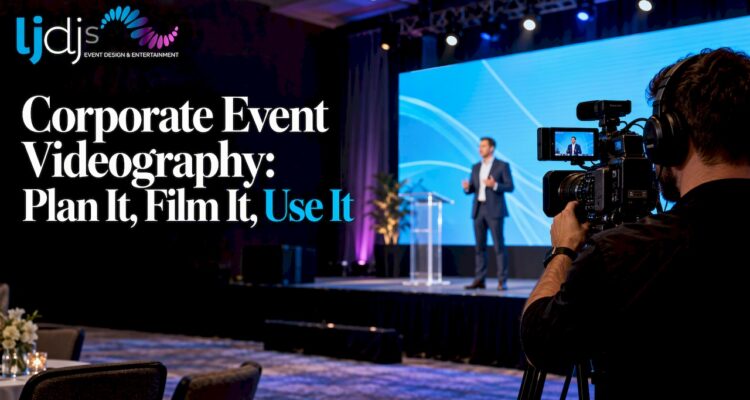
Corporate event videography is the filming and editing of a conference, gala, launch or meeting so the event keeps working after the room empties. The best results come when the video is planned together with the event’s sound, lighting, stage and screens, not added at the last minute. That is why we offer photography and videography alongside the entertainment and production side of the event.
This guide is for the person who has to hire, brief or approve the video: an event planner, a marketing lead, an HR or executive assistant. It covers what a corporate event videographer does, the video types worth ordering, a shot list, audio, the factors that drive a quote, and how to use the footage for a year.
TL;DR
- A corporate event videographer documents speakers, guests and brand moments, then edits them into assets such as a recap, speaker clips and testimonials.
- Decide the finished videos before the event. The deliverables determine the crew size, the shot list and the quote.
- Clean audio matters more than camera quality. Plan for a feed from the sound system, a microphone on each speaker and a backup recording.
- Cost depends on hours, crew size, number of deliverables, travel and turnaround, so ask for a quote built on your list of videos.
- Release the footage in phases over the year, and clear rights for any music or clips you did not create.
Table of Contents
- What a corporate event videographer does
- Video types to order before you book
- Plan the shoot with a short brief
- A corporate event shot list that works
- Audio: the part that makes or breaks the video
- What affects a corporate event videography quote
- Why video belongs inside event production
- Use the footage for a year, not a week
- Our perspective
- Plan your event video with us
- FAQ
- Sources
What a corporate event videographer does
Professional event videographers are video producers who document and preserve important social and corporate events and presentations, as the Wedding & Event Videographers Association describes the profession. In practice, that covers four jobs:
- Planning. Learning the agenda, venue, speakers and the people who must be on camera.
- Capture. Filming keynotes, panels, guests, signage, sponsors and the small moments between sessions.
- Audio. Recording speech cleanly, because a video with muffled speakers cannot be used.
- Post-production. Editing, color, titles, music, captions and delivery in the formats you need.
The event industry has moved toward the view that a business event should engage both the people in the room and the online audience, and keep the conversation going after the event ends, according to PCMA. Video is the main tool for that second audience.
Video types to order before you book
Ask for deliverables, not hours. Each of these has a different purpose and needs different footage.
| Video type | What it captures | Best used for |
|---|---|---|
| Event teaser | Short, energetic highlights from the venue, setup and early arrivals | Social posts during or right after the event |
| Event recap | Two to four minutes of the best moments across the day | Website, email to attendees, sponsor reports |
| Speaker highlights | The strongest 60 to 90 seconds of each keynote or panel | LinkedIn, newsletters, sales follow-up |
| Full session recordings | A complete, clean record of each talk | Gated content, internal training, absent staff |
| Testimonials | Attendees, sponsors and speakers answering a few questions | Next year’s registration, sales decks |
| Behind-the-scenes | Production, rehearsals and team moments | Recruiting, culture content |
For testimonials, a dedicated station beats chasing guests with a camera. Our video testimonial booth gives attendees a set place to record their comments, and the finished clips feed straight into the recap.
Plan the shoot with a short brief
A one-page brief prevents most of the problems clients regret later. Put these in writing:
- Purpose and audience. Who will watch the video, and what should they do afterward: register, buy, believe in the company?
- Deliverables and lengths. For example one recap, one teaser and a set number of speaker clips.
- The must-have list. Executives, award moments, sponsor logos, product demos, a specific banner.
- The run of show. Times, rooms, stage changes and any session that is off the record.
- Access. Parking, load-in time, badges and who authorizes filming in restricted areas.
- Delivery. Who approves the edit, in what format files arrive and by what date.
Name a single approver on your side. A guide to conference editing from Klap points to asset organization and approval discipline as major schedule controls: clear naming, one review source and timecoded feedback reduce wasted editing rounds. Several people sending conflicting notes by email is the usual reason a recap runs late.
A corporate event shot list that works
A shot list is the written plan of what the camera must get. Build yours in the order things happen at the event.
Before doors open
- Venue exterior and entrance signage
- Stage, set, screens and lighting before guests arrive
- Registration desk, name badges, welcome materials
- Branded details: banners, step-and-repeat, table settings, swag
During the program
- Wide shot of the full room showing the stage and audience
- Medium shot of each speaker, plus a close-up for emotion
- Audience reaction shots: laughter, note-taking, applause
- Slides or LED screens, shot so the text is readable
- Q&A moments with the questioner on camera
Between sessions
- Networking and conversations, with attention to natural interaction
- Sponsor booths and product demonstrations
- Food, drinks and entertainment moments
- Hands-on activities and any photo or testimonial stations
Closing
- Awards, toasts or announcements
- Group shots and goodbyes
- Cutaway shots you can use to cover edits: hands, signage, details
Shoot more cutaways than seems necessary. They let an editor tighten a speaker’s remarks without a visible jump, and they hide any gap in the footage.
Audio: the part that makes or breaks the video
Viewers forgive a plain image far sooner than bad sound. Plan audio in three layers:
- A feed from the venue sound system. It gives a clean mix of the microphones already in use. Confirm in advance that the soundboard has an output the video team can plug into.
- A microphone on each speaker. A wireless lapel microphone for keynotes, and a dependable handheld for panels and Q&A.
- A backup recorder. A second recording running independently saves you when a battery dies or a cable fails.
Also ask for a few seconds of room tone, the quiet sound of the empty venue, which editors use to smooth cuts. This is where coordination pays off. When the same company runs the sound, lighting and screens, the video crew does not have to negotiate a feed with a separate vendor on the day. Our event audio visual services page explains what that covers.
Lighting matters too. Stage lights that look fine to the eye can leave faces dark on camera. Check the lighting during rehearsal, and ask for a clear look at how screens will appear in a shot, since a bright LED wall can overwhelm a camera’s exposure. Our production team works with intelligent lighting and LED screens, so those settings are decided together with the camera plan.
What affects a corporate event videography quote
The question “how much should a corporate event videographer charge?” has no single answer, because quotes are built from a handful of decisions you control. We do not publish a price for videography, and the final number depends on your event. These are the factors that move it:
- Hours on site. A two-hour keynote and an all-day conference are different jobs, and so are setup and teardown time.
- Number of cameras and crew. One operator can cover a small meeting. Multiple rooms, a stage and a roaming crew need more people.
- Number and length of deliverables. A recap, ten speaker clips and full session recordings are three distinct editing workloads.
- Turnaround. A same-week teaser costs more effort than a recap delivered in a few weeks.
- Extras. Captions, a testimonial station, drone footage where allowed, live streaming, graphics and licensed music.
- Location and travel. Metro New York and New Jersey venues often involve load-in rules, parking and union or building requirements that affect staffing.
When you request quotes, send the same brief to each provider and ask for the deliverables itemized. That makes the offers comparable and shows what is included. If your event also needs sound, lighting or staging, see our guide to corporate event production and what it costs to budget the whole event rather than the video alone.
Why video belongs inside event production
Most videography problems are production problems: a speaker with no microphone, a dark stage, a screen that flickers on camera, a room that is too crowded for a camera position. Hiring one team to handle the filming and the production side removes a lot of those handoffs.
Brand consistency is part of the same decision. The look of your stage, screens and signage is what appears in every frame, so the design work shown in a guide to event and exhibition branding carries straight into the footage. Our corporate event design guide shows how to plan that look so it reads well on camera as well as in person.
Use the footage for a year, not a week
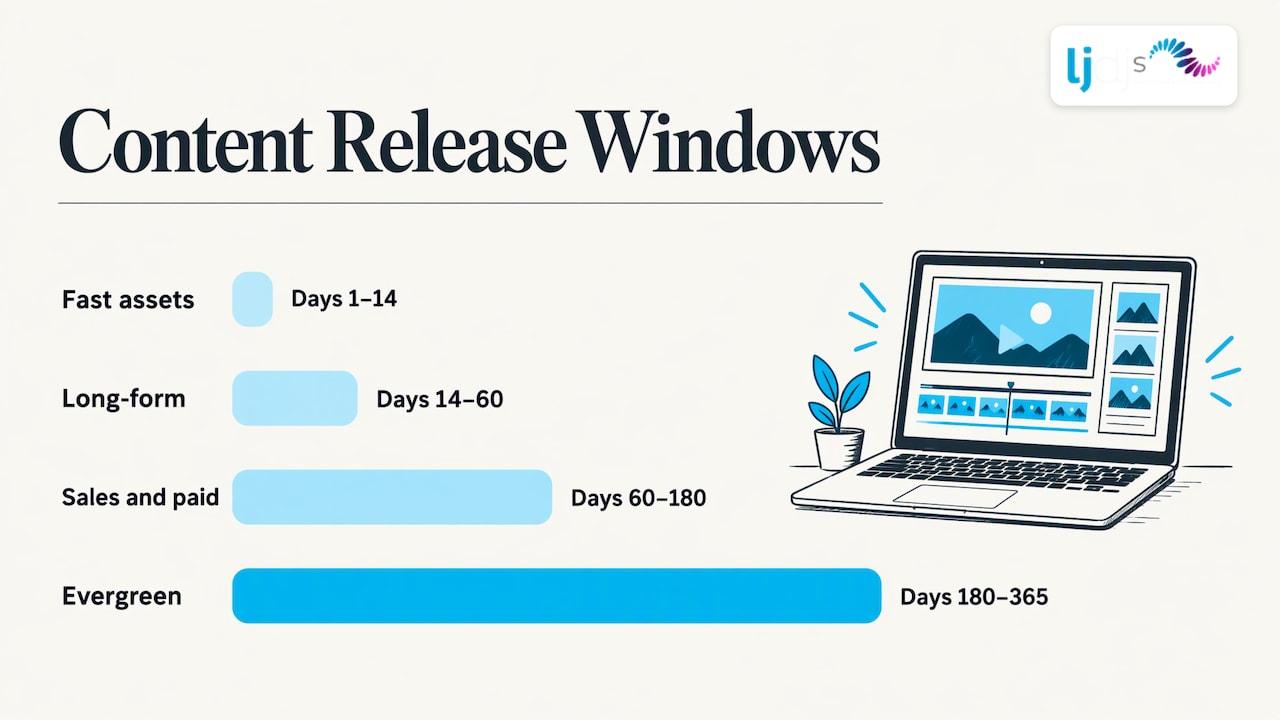
The event is a source of content for months. A phased plan keeps it from being posted once and forgotten. Samaaro’s repurposing workflow is one useful model: publish the fast, high-interest assets in days 1 to 14, long-form and gated content in days 14 to 60, sales and paid assets in days 60 to 180, and evergreen content through days 180 to 365.
Applied to a typical corporate event, that looks like this:
- Week one: teaser, photo highlights and two or three speaker clips on social.
- Weeks two to eight: the full recap, full session recordings behind a registration form, a thank-you email with a video link.
- Months two to six: testimonial clips in sales decks and proposals, sponsor reports with footage of their booth.
- Months six to twelve: a short video for next year’s registration page and evergreen clips for recruiting or onboarding.
Organization makes this possible. Klap’s guide recommends sorting files by session, camera angle, audio source and slides, spot-checking for sync, drift, corruption and levels, and using a versioned review process with timecoded notes. Ask your videographer how they will name and deliver files, so the raw footage is usable months later.
Clear the rights before you publish
Footage you filmed is yours to plan around, but what plays inside it may not be. PCMA reports that showing copyrighted movies or TV clips publicly at a corporate conference generally requires public-performance permission, and that buying or renting the content does not by itself give you that right (PCMA, 2017). The same care applies to music played at the event and to anything in your recap that you did not create. Also get speaker and sponsor approval for sharing their sessions, and tell attendees that filming is taking place.
Our perspective
Corporate video fails when it is treated as an add-on. The camera crew arrives after the lighting is set, the sound is already patched, and nobody has told them which executive must be filmed.
We approach it as part of the event design. We have been producing events for over 25 years, and our photography and videography team works alongside our production, lighting, LED screens and entertainment. That means the shot list, the stage look and the audio plan come from one conversation.
We also think the testimonial is the most underused piece of corporate video. A guest saying in their own words why they came is worth more than any caption. That is why we offer video testimonial booths, and why we start every video plan with the question: what will this be used for in six months?
Our events serve New Jersey and New York, and we work internationally. Whether the room is a ballroom, a conference center or a rooftop, the goal stays the same: footage you can use long after the event.
LJDJS
Plan your event video with us
If your event is in New Jersey, New York or beyond, our photography and videography service is the place to start. We build the video around the event: what you need to show, who must be on camera and how the footage will be used afterward. Tell us the date, venue and the videos you want, and we will plan the coverage with the rest of your production.
For virtual or hybrid events, our virtual event production guide explains how filming and streaming fit together, and our videos page shows our work.
FAQ
What does a corporate event videographer do?
They plan the coverage, film speakers, guests and brand moments, record clean audio and edit the footage into finished videos. Typical deliverables are a recap, a teaser, speaker clips and testimonials. A good videographer also organizes and delivers the files so you can reuse them later.
How do you film a corporate event?
Start with a brief and a shot list built around the agenda. Capture a wide room shot and a close shot of each speaker, then audience reactions, sponsor areas and cutaways. Get audio from the sound system plus a microphone on each speaker, and run a backup recording.
How much does corporate event videography cost?
It depends on hours on site, crew size, the number and length of videos, turnaround time and extras like captions or live streaming. The most reliable way to compare is to send the same itemized brief to each provider. For a quote on your event, contact us through our photography and videography page.
How soon should we book?
Book as soon as the date and venue are set. Early booking gives time to visit the venue, settle the audio feed with the production team and agree on deliverables before the final agenda is locked.
Can we use the video on social media and in ads?
Yes, as long as you have rights to everything in it. Clear music and any third-party clips, get approval from speakers and sponsors, and let attendees know filming is happening. Then release the content in phases through the year.
Sources
- About WEVA
- Trendspotter: Social Media Do’s and Don’ts For Events (PCMA)
- The Rights Stuff: Are You Licensing Those Video Clips? (PCMA)
- Conference Video Editing: A Practical Workflow Guide (Klap)
- Event Content Repurposing: Turning a 3-Day Event into Year-Round Demand (Samaaro)